
Getting started
lys-splash is the lys desktop's boot splash. It takes Plymouth's place: it shows a logo and a throbber from the initrd until the display manager or the login prompt takes over, asks for disk passwords on the way, and shows a splash again on shutdown and reboot.
It speaks plymouthd's socket protocol and answers to plymouth's command line, so systemd, its password agents and scripts that call plymouth work without changes. It replaces Plymouth; the two do not run side by side.
What you see

- The logo. The firmware's own logo when it left one on screen, otherwise lys's.
- A throbber. A spinner, or three dots if the theme asks for them.
- A progress bar under it, from the second boot on. It compares this boot's time with how long the previous one took, and stays short of full until the splash quits. The first boot has nothing to compare with and shows no bar.
- A password prompt when a disk needs one. A test pattern stands in for the firmware's logo in this picture:
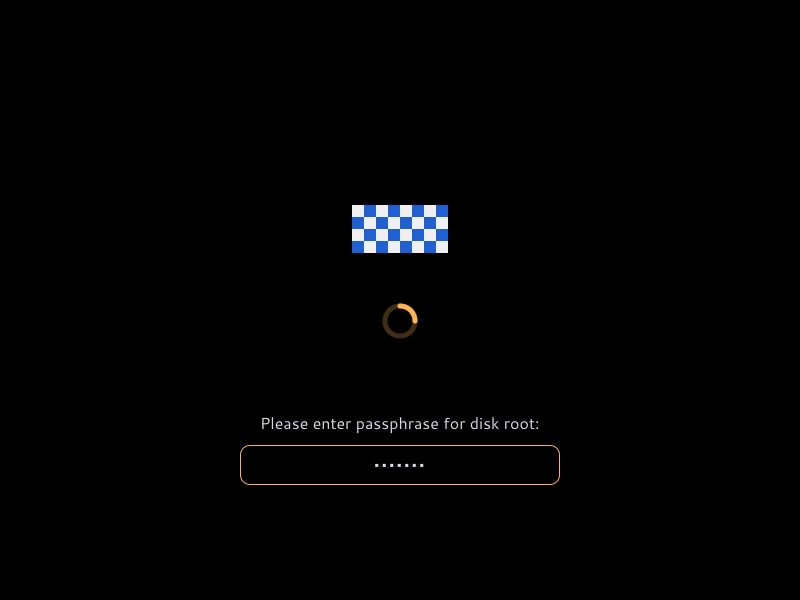
Shutdown, reboot and kexec show the same logo and throbber, until the power goes.
Keys
| Key | What it does |
|---|---|
| Esc | Shows the boot messages, and the splash again |
| Enter | Answers the prompt |
| Backspace | Deletes the last character typed |
| Ctrl+C, Ctrl+D | Abandons the prompt |
Keys are read from the virtual terminal, so they follow the console's keymap.
Next
- Install it on NixOS, or on Ubuntu or Debian.
- Reboot. To boot once without it, add
plymouth.enable=0to the end of the kernel command line. - Change its colours, logo or throbber in
theme.yaml.
Not on a running desktop
The splash takes DRM master on every card and the active virtual terminal. Starting the daemon by hand on a machine you are using takes the display away from your session. Try it in a VM.